
In brief:
- Generate a complete bol.com listing within 10 seconds
- Refine the individual sections until you've created the perfect listing!
What can I do with the Listing Generator feature?
The Boloo 'Listing Generator' creates a complete listing text for bol.com within seconds. Enter basic information about your product (product name and brand name), a few keywords you want to use, and optionally the target audience, tone of voice, language, and notes - then click 'Create listing'. Boloo AI will get to work generating a bol.com listing based on 100,000+ proven high-converting listings that perfectly meets bol.com's requirements.
Benefits
- Quickly and easily write a high-converting listing for your product on bol.com
- No more spending €100+ on a copywriter
- Keep generating different versions until you're satisfied with the content
How does it work?
Step 1 - Open Boloo AI
Step 2 - Click on 'Listing Generator' in the Tools
Step 3 - Start filling in the required information: Product name, Brand name, Keywords. Not sure which keywords to use? Click 'Generate keywords'.
Step 4 - Click 'create listing', and Boloo AI will get to work for you
Step 5 - Want to regenerate one of the sections? Click the regenerate icon.

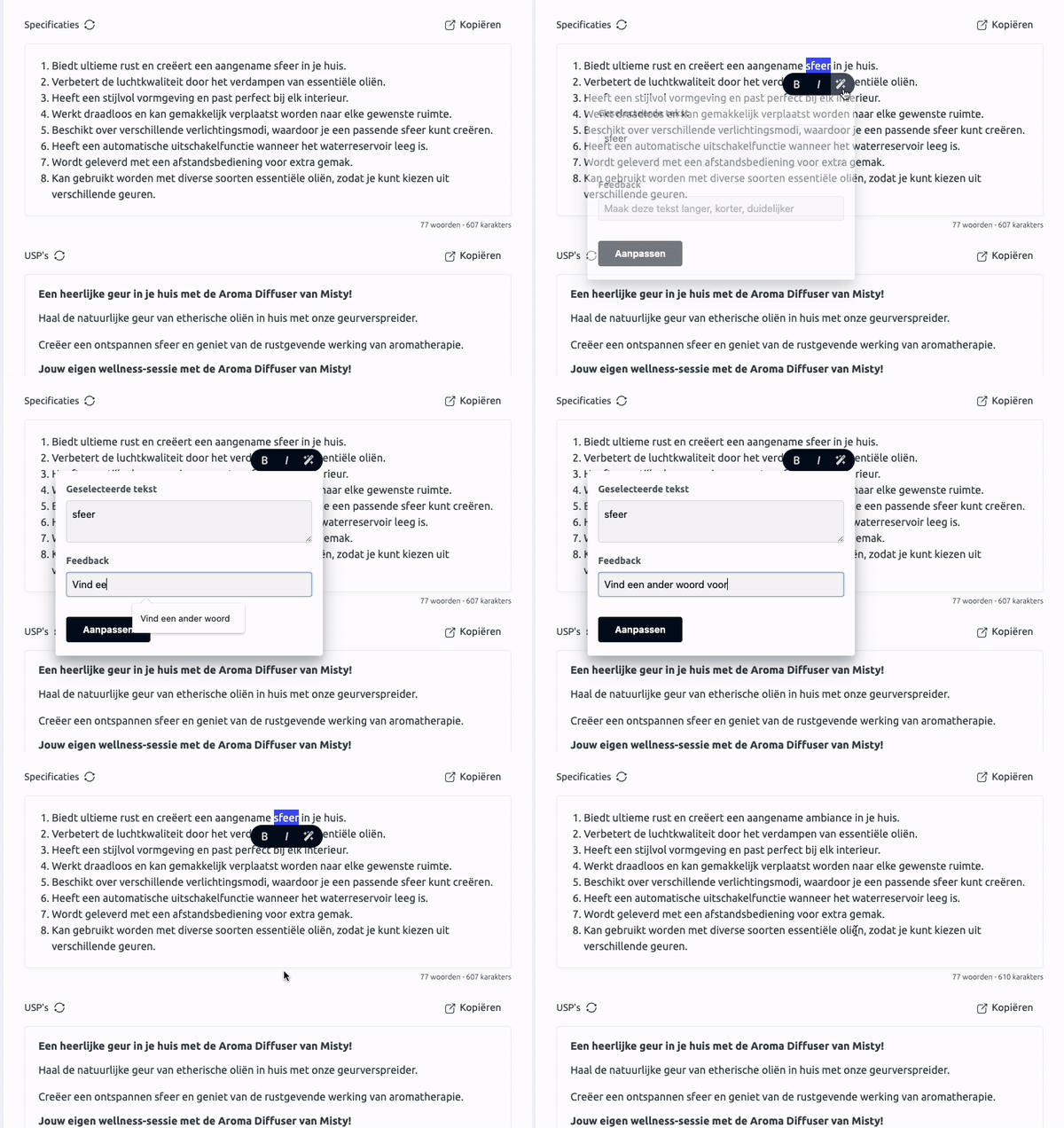
Step 6 (TIP) - Want to adjust a specific part of the text? Select the text, click the 'Improve' option (the magic wand icon), type what you want to change, and click 'Apply'
Step 7 - Ready to publish the listing on bol.com? Copy the title by clicking 'Copy'. Click 'Copy full product description' - the entire product description will be copied in HTML format, ready to paste directly into bol.com.
Tips
- Provide as much information to the tool as you have available.
- Enter at least 3–5 keywords
- Describe the target audience as specifically as possible
- Try different 'Tone of Voice' options
- Made a typo? Press CTR + Z (Windows) or CMD + Z (Mac)
Autosave: We automatically save all changes you make.
FAQs
Can I use the 'Listing Generator' in languages other than Dutch?
Yes, the 'Listing Generator' supports English, French, German, and Spanish in addition to Dutch.
What does 'link product' mean?
The 'Link product' option is intended to improve organisation. Linking a product does not mean anything is synchronized with bol.com.
How can I send my fully generated product description to bol.com?
Click 'Copy full product description'. The entire product description will then be copied in HTML format, and you can paste it directly into bol.com.