
Search for the product variants in your range that you want to put in a family. Items within a product family must meet three conditions:
- The items are in the same product group.
- The items are from the same brand, or by the same author or artist.
- The items each have a distinguishing characteristic.
2. Select the product variants
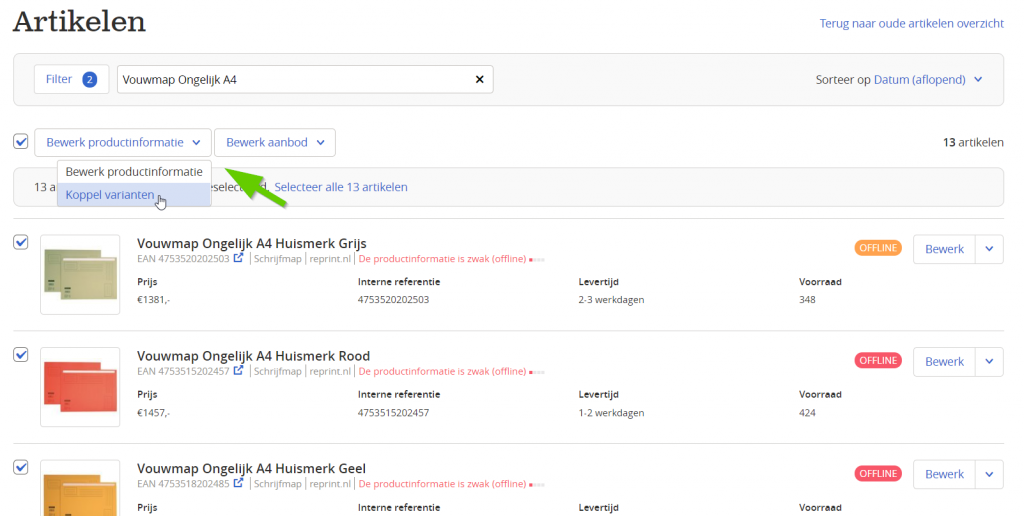
Select the items you want to put in the family. You can paste all EANs directly into the search bar. Then click 'Edit product information' and 'Link variants'.
3. Selected items will be checked
The selection may be rejected if no distinguishing characteristic has been set for the items. In that case, adjust the selection.
4. Check distinguishing characteristics
An item that lacks a distinguishing characteristic will not be shown as a variant on the product detail page.
5. Check spelling
It is important that all characteristics are spelled the same way. Open text fields are case-sensitive.
6. Check for duplicate items
If two or more items have exactly the same colour and size, only one will be shown.
7. Link the variants
It may take up to 24 hours for the changes to become visible on the product detail page.