
Using tags, you can personalise the emails you send to your customers via the email campaign.
Tags are variables you can use in your email that are later replaced by the system with the personal details of the relevant order.
For example, if you use the tag {{first_name}} in the body of your email, the system will replace the tag with the customer's first name.
You can find these tags in the email editor. Once you have added a text element and click on the text itself, a toolbar will appear and you can click 'Personalise' on the right side of the toolbar.
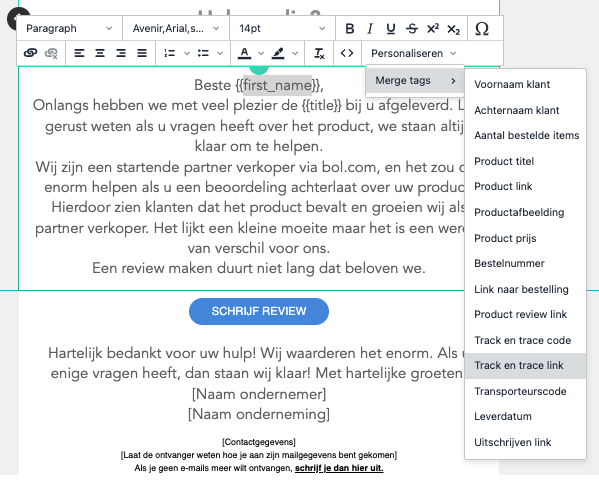
The following tags are available:
- Customer first name
- Customer last name
- Number of items ordered
- Product title
- Product link
- Product image
- Product price
- Order number
- Link to order
- Product review link
- Track and trace code
- Track and trace link
- Carrier code
- Delivery date
- Unsubscribe link (for customers who no longer want to receive emails from you)